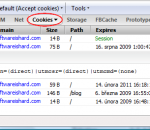
Firecookie is a an extension for Firebug that makes possible to view and manage cookies in your browser. Apart from all the other cookie managers and viewers available as Firefox extensions, this one is made as an extension for Firebug, so web developer has the functionality accessible within familiar Firebug's UI. Once Firecookie is successfully installed you should see a new tab within Firebug's bar called simply Cookies. This tab displays a list of all cookies associated with domain of the currently displayed page. Each entry in the list displays basic information about a cookie (name, value, domain, path, expire date, etc.). Inspect Cookies Every cookie in the list is expandable. This is useful especially when the cookie value is long and can't be fully displayed directly. If you are looking for a specific cookie by name, use Firebug's search box and write down it's name. The list is dynamically filtered as you type in the box. Cookie Permissions You can also manage cookie permissions for the current site directly from the Firebug's toolbar. The permission button displays the current status as a label and it's automatically updated if the permission is changed (e.g. from the Firefox options dialog). Cookie Events If you want to see when something happens to a cookie, use Firebug's Console tab. Firecookie creates a log entry every time when a cookie is created, changed, deleted or rejected. This can be switched off in Cookie->Options menu. Cookie Expire Time Cookie expire time is displayed using local timezone and current Firefox locale. It's easy to figure out the actual value. It's also possible to change the current value using a popup calendar and time picker. Both calendar and time-picker has been introduced in Firefox 3. Export Cookies Use Cookies menu to create new and remove an existing cookies. The same menu can be also used to export all cookies in the browser or only those that are associated with the current page into cookies.txt file in standard text format (every cookie + info takes one line).
Get the most extensive and sexy web design bundle ever at the highest quality! The shock bundle offers 100 wp themes and templates, Web Element sets, Characters sets , 500 Logo templates and up to 20000 icons. Our templates offer multiple color schemes and are fully customizable, so you can choose between multiple color options and nice effects amongst many other options. All our themes and graphics sets include full layered sources
free watch tv online from world,Watch all Movies and TV shows online for Free. Free live tv online streaming. Internet Videos and online movies of The best internet TV
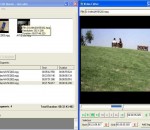
Free video editor of any AVI (Divx, Xvid..etc) and MPEG video files without re-encoding, fast and with no quality loss. Video Edit Master is a free video editor including these features: - Cutting and joining video files that have the same encoding, resolution and frame rate easily and fast without re-encoding. - Removing commercials from video files very fast. - Capturing video frames as images. - Easy to use user friendly GUI. - Final video will have the same quality of the original files.
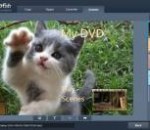
Do you want to create your own DVD movies from downloaded videos? Do you want to make special DVD gifts for your family and friends with home videos or vacation videos? DVDFab DVD Creator is the best solution. Features Highlight: 1. Burn all sorts of video formats. DVD Creator can burn all sorts of videos to DVD. Downloaded videos, camcorder videos, and videos shared from others are all OK. And the supported formats are MKV, MP4, AVI, M2TS, TS, MOV, WMV, WMA, 3GP, FLV, M4V, VOB, etc. 2. Create DVD disc as gift. Want to burn a few video clips into DVD disc to make a cool gift? The source material can be footages of family events, holiday vacation, and other merry or landmark moments in your life. Just burn them into DVD and share with others. 3. Create DVD movies on your own. If you have some video downloads, and want to burn them into discs to make a special DVD movie on your own, DVD Creator can help out. 4. All DVD outputs supported. DVD9, DVD5, DVD+R/RW, DVD-R/RW, DVD+R DL and DVD-R DL are all supported as the target DVD disc formats. 5. Burn many videos at one time. DVD Creator can process many videos at one time, and allows you to arrange the playback order of the videos in the output DVD. 6. Real time preview and external subtitles supported. You can preview video in real time to check if the content is what you want. And you're allowed to add external subtitles to go with the video. 7. Support acceleration high-techs to ensure fast speed. Besides multi-threading and multi-core CPUs, DVD creator also supports the newest acceleration technologies like Intel Quick Sync, and NVIDIA DUDA to ensure users blazing fast converting and burning speed. 8. Monitor everything during converting process. During converting process, DVD Creator lets you plainly see all detailed progress info, and preview the source video to view the progress vividly. For more information about DVDFab DVD Creator, please visit www.dvdfab.com/dvd-creator.htm.
FoxyTunes is a powerful browser add-on. Control the music playing in your favorite media player as you surf the web. No more switching back and forth between iTunes and your browser. FoxyTunes - Do you listen to Music while surfing the Web? Now you can control your favorite media player without ever leaving the browser and more... Features: * Tiny, unobtrusive and customizable * Multiplatform - works on MS Windows, Linux and Mac OS X * Supports more than 30 media players, will support more players in future versions * Also supports Mozilla Thunderbird, SeaMonkey and Flock * Position anywhere in the browser - on the status bar or on one of the toolbars * Volume controls * Seek Slider * Configurable keyboard shortcuts * Currently playing track information * Customizable and collapsible * Auto-hide * Skinnable and localizable. * Automatically launch your player when needed * Pop up and hide the player window with a click * Correctly shows track information encoded in any language, supports Unicode * Alarm Clock and Sleep Timer * No third-party controller applications and plugins - everything is done efficiently by the FoxyTunes extension Advanced features * Built-in Signatunes - music signatures for email, blog and forums * Automatically finds and displays album covers * Music Web searches - lyrics, images, info, video and much more * FoxyTunes Mini desktop widget with its own tabbed mini browser * Shows recently played song history * Stream podcasts directly from the Web to your media player * Subscribe to podcasts (only with supporting players) * Stream media files (mp3's, m3u's etc.) directly from the Web to your media player * Optional extra - TwittyTunes - post your currently playing songs to Twitter with a click Supported Players The following players are currently supported by FoxyTunes: Windows * iTunes * Winamp * Winamp 3 * AOL Radio featuring XM [supported by installing Winamp 5.1] * Foobar2000 [see note] * Windows Media Player * Windows Media Player 8 [see note] * Yahoo! Music Jukebox * RealPlayer * Musicmatch Jukebox * Apollo * Sonique * Quintessential Player (QCD) * J. River Media Center * jetAudio * musikCube * XMPlay * TTPlayer * Aimp2 * The KMPlayer * Spotify * Zune * MediaMonkey * wxMusik * CoolPlayer [see note] * dBpowerAMP Audio Player [see note] * 1by1 Player [see note] * Zinf [see note] * UltraPlayer [see note] Linux * XMMS * Beep Media Player [see note] * Noatun * Juk * Amarok * Music Player Daemo * Rhythmbox MacOS X * iTunes Cross Platform * Deezer * Blip.fm * Songbird * YouTube * Last.fm Player * Pandora * Rhapsody Online * XBox Media Center
Video from webcams on mobile - for home surveillance or just for fun! No need to purchase any expensive equipment. All you need is a webcam or network camera to record everything that goes on when you are away. Complete video surveillance at a reasonable price! Main Features * Watch real time webcam video stream on your mobile. Keep an eye on your children even when away from home; See your loved one at any time when separated by distance or observe your work place and employees in the office during trips. * Get motion detection alerts over email. Be notified of all motion detections and instantly watch a video stream from a place you observe or look trough the recordings later. * Almost any web / network camera support. You can watch up to 4 web / network cameras simultaneously. Supported network cameras. * New! Hear sound from the cameras connected to Mobiscope Desktop. How to start: 1. Download Mobiscope Client and install it on your phone. To download over-the-air open wap.mobiscope.com in your mobile browser. Add your network camera to the camera list. That's it! You can start viewing cameras right away. 2. If you have web cameras connected to your computer you should also download Mobiscope Desktop. Install it on the computer. Setup is automatic and takes only a few minutes. During the installation process the Mobiscope Desktop will be registered in the Mobiscope Online Service and the unique number will be assigned to your computer. Registration in the Mobiscope Online Service is totally free. Read step-by-step guide of Mobiscope Desktop installation for more information. Download Mobiscope Client and install it on your mobile. To download over-the-air open wap.mobiscope.com with your mobile browser. 3. Enjoy working. Add the computer number into the Mobiscope Client's address book to access the webcam connected to the computer from your mobile.
LinkChecker is a simple, very easy to use application specially designed to help you check websites and HTML documents for broken links.
Easily convert MBX files to PST and use the converted PST files with Outlook 2010, 2007, 2003, 2002, 2000 to open Eudora emails into Outlook, Convert MBX to PST software is now with batch support to convert multiple MBX to PST in just a single click.
Imagia is a non-destructive photo editor. No changes are made to the original photo, no matter what you do with it. This means that you are free to experiment. It means your creativity is not limited by fear of doing something wrong. Imagia has consistent user interface. It always runs fullscreen and the settings are always in the same place. Once you learn it, you will never feel lost. Keyboard use in Imagia introduces new original ideas. Learning Imagia is a pleasure. It is pure fun to see how fast this program runs, how your image within seconds turns into masterpiece and few seconds later you find a setting that makes it even better. There are dozens of settings to change at your fingertips. Not hidden in menus and modal dialogs but just on the left in the main window. If your photo needs straightening or cropping - use Imagia to do it. Global adjustment is a start. Imagia allows user to use brush to change photos locally. Lighten some parts of an image and darken the others, sharpen the eyes and smoothen the skin... Color, black and white, lomo, selective color, dualtoning... There are over 40 settings templates ready after you install Imagia. Each template represents different style. Users can save their own templates and share them online easily. Pick new templates from the gallery on OproLab's web page and download them free. If you use RAW format when you shot your photos you can't pick any image editor. Most of them does not open RAW formats. Imagia has no limits in this matter. Thanks to dcraw developed by Dave Coffin it can open almost any Raw file. When a new camera appears on the market dcraw usualy is first that can open its files. dcrawFront added to Imagia makes using dcraw more intuitive. Edited photos can be easily uploaded to Facebook, Google and Skydrive. Mind you that those photos will have small, discreet IMAGIA watermark on it to encourage you and a your friends to buy full version of IMAGIA. Because of its accurate and fast color matching capability, Mosaizer Pro is used by enthusiasts and professionals all over the world. FEATURES: · Overlays - bitmaps on top of each cell of the photo mosaic to create depth · 32Bit bitmap masks - combine the bitmap overlay and its alpha mask · 3D effects - like shadow, buttons, windows and splat! · A very accurate color matching engine (benchmark quality) · Multiple-language support · Cropping: only render what you want · Multiple file formats: bmp, jpg (jpeg), png, ico, gif, wmf and emf · The Genuine Paintbrush - to literally paint with pictures · Create picture libraries · Use of textures to create additional 3D effects · Edit functionality - to edit parts of the result by search/replace · Single cell mosaizing - to paint a picture by repeatedly using its own bitmap · Pre-processing - make sure the best picture library is used · Post-processing filters (color blending, color correction, tile edit) · Cell colorizing - to better match with the source colours
FireSSH is a cross-platform Firefox extension designed as a handy and reliable SSH terminal. Written entirely in Javascript! After installation, you can access FireSSH from the Tools menu of Firefox. It will enable you to create new accounts and to make the necessary connections. You can start using it in a few steps.
GOM Media Player The only media player you need - for FREE! Not only is GOM Media Player a completely FREE video player, with its built-in support for all the most popular video and Media Player formats, tons of advanced features, extreme customizability, and the Codec Finder service, GOM Media Player is sure to fulfill all of your playback needs. With millions of users in hundreds of countries, GOM Media Player is one of the world`s most popular video players. Whats New : Added "Touch Setting" feature for touch screen devices. Added "Search box" feature on playlist. (Ctrl+F) Supported "HTTPS URL" for youtube or net radio playback. (Ctrl+U) Added "Music Tap" on preferences related to play music files. Improved performance related to "speed of add & delete" of files on playlist. Other miscellaneous corrections, fixes, and changes
Iperius Backup is one of the best free backup software, also released in commercial editions for those who need advanced backup features for their companies. The freeware version of Iperius Backup allows you to backup to any mass storage device, such as NAS, external USB hard drives, RDX drives, and networked computers. It has comprehensive scheduling and e-mail sending functions. It supports zip compression with no size limit, incremental backup, network authentication and the execution of external scripts and programs.
Maryfi is a free and easy to use software router for Windows 7, 8 , and 8.1 computers. With Maryfi, users can wirelessly share any Internet connection such as: a cable modem, a cellular card, or even another Wi-Fi network. Other Wi-Fi enabled devices including laptops, smart phones, music players, and gaming systems can see and join your Maryfi hotspot just like any other Wi-Fi access point and are kept safe and secure by password-protected WPA2 Encryption.