TouchCopy is designed to help you perform content transfers between your iPod or other iOS device and your computer. It is compatible with all iPod, iPhone and iPad versions and allows you to backup multimedia files, apps, messages, contacts, audio books, call logs, calendars and so on. TouchCopy was designed to help you easily transfer your Music, Video, Photos and Games from your iPod or iPhone to your PC. Features: Copy iPod Music, Playlists and other iPod content to your PC or Mac. You can copy any iPod including the iTouch, iPhone (2G, 3G and 3G S), iPod Classic, iPod Nano and other iPod models. Transfer iPhone or iPod to iTunes - Music, Playlists, Videos, Podcasts, Audiobooks and iPhone ringtones. TouchCopy will also transfer your Album Art, Ratings, Play Count and other song data. iPod Backup of all your iPod content at the touch of a button. Backup to your PC or Mac hard disk, external hard drive or into iTunes. Copy iPod Photos. View and Copy iPod and iPhone Photos to your computer. View and save photos taken on your iPhone. Copy and manage Notes, Contacts and Calendars on your iPod - all from within TouchCopy. Use your iPhone or iPod Touch like an external hard drive. Store any type of data, move your files between your home and office. Use your iPhone as a backup device. (iPod Touch and iPhone Only )* View, Play and Copy Voice Memos recorded on your iPod or iPhone to your PC or Mac. Copy iPod Games back to your iTunes library. Search for music on your iPod. The search results can be saved to your computer or transferred into iTunes as a playlist. Play music and video on your iPod through your PC or Mac without having iTunes installed. Use TouchCopy to change your music rating.
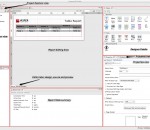
The Jaspersoft Studio application is specially built to be a report designer for JasperReports. The program is a full rewrite of the iReport software on top of the Eclipse platform.
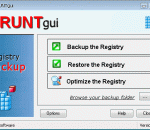
Portable ERUNTgui is the portable version of ERUNTgui developed to be able to run from a USB flash drive or any other portable device. ERUNTgui is a graphic user interface for the popular registry backup and restore program "ERUNT" created by Lars Hederer.
The world’s most downloaded free security software Basic protection for surfing, searching and social networking Millions of people around the world use AVG Anti-Virus Free for their basic online activities. Whether it’s surfing the Internet, conducting web searches, or simply keeping up with friends on Facebook, AVG Anti-Virus Free has got you covered. AVG Anti-Virus Free Edition 2011 allows you to: * Surf and search with confidence AVG LinkScanner's® real-time protection * Stay protected on social networks with AVG Social Networking Protection * Enjoy a faster running PC AVG Smart Scanning works while you're away and runs in low-priority mode when you return * Stay up-to-date with the latest threat information from the AVG Community Protection Network and AVG Protective Cloud Technology AVG Free provides you with basic antivirus and antispyware protection for Windows and is available to download for free: * The most downloaded software on CNET's Download.com * Free protection against viruses and spyware (antivirus and antispyware * Fast, effective security that is kind on resources * Compatible with Windows 7, Windows Vista, Windows XP and Windows 2000 CORE PROTECTION Anti-Virus , Anti-Spyware, Smart Anti-Rootkit (ENHANCED) Makes sure you can’t receive or unintentionally spread even the toughest viruses or spyware AVG Identity Protection Protects your identity by recognizing suspicious and illegitimate software SURFING, SEARCHING AND SOCIAL NETWORKING AVG Social Networking Protection (NEW and UNIQUE to AVG) Protects you and your friends on social networks AVG LinkScanner® (ENHANCED) Checks web pages in real time before you visit them and shows safety ratings in your search engine results list CHATTING AND DOWNLOADING AVG Online Shield™ for safe downloading Checks files before you download them AVG Online Shield™ for safe chatting Ensures online chat links are safe SUPPORT Priority updates Access to our technical experts for support and assistance SHOPPING AND BANKING AVG Firewall (ENHANCED) Keeps hackers out and your private information safe AVG Anti-Spam Blocks spammers and scammers
Do you want to create your own DVD movies from downloaded videos? Do you want to make special DVD gifts for your family and friends with home videos or vacation videos? DVDFab DVD Creator is the best solution. Features Highlight: 1. Burn all sorts of video formats. DVD Creator can burn all sorts of videos to DVD. Downloaded videos, camcorder videos, and videos shared from others are all OK. And the supported formats are MKV, MP4, AVI, M2TS, TS, MOV, WMV, WMA, 3GP, FLV, M4V, VOB, etc. 2. Create DVD disc as gift. Want to burn a few video clips into DVD disc to make a cool gift? The source material can be footages of family events, holiday vacation, and other merry or landmark moments in your life. Just burn them into DVD and share with others. 3. Create DVD movies on your own. If you have some video downloads, and want to burn them into discs to make a special DVD movie on your own, DVD Creator can help out. 4. All DVD outputs supported. DVD9, DVD5, DVD+R/RW, DVD-R/RW, DVD+R DL and DVD-R DL are all supported as the target DVD disc formats. 5. Burn many videos at one time. DVD Creator can process many videos at one time, and allows you to arrange the playback order of the videos in the output DVD. 6. Real time preview and external subtitles supported. You can preview video in real time to check if the content is what you want. And you're allowed to add external subtitles to go with the video. 7. Support acceleration high-techs to ensure fast speed. Besides multi-threading and multi-core CPUs, DVD creator also supports the newest acceleration technologies like Intel Quick Sync, and NVIDIA DUDA to ensure users blazing fast converting and burning speed. 8. Monitor everything during converting process. During converting process, DVD Creator lets you plainly see all detailed progress info, and preview the source video to view the progress vividly. For more information about DVDFab DVD Creator, please visit www.dvdfab.com/dvd-creator.htm.
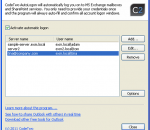
CodeTwo AutoLogon automatically logs you on to MS Exchange mailboxes and SharePoint platforms. Owing to this, users do not need to fill in their credentials in the system window every time they need to access these services from outside their domain profile. CodeTwo AutoLogon allows users to quickly view and edit SharePoint documents, open their Exchange Mailbox in MS Outlook, or work efficiently on many accounts at once.
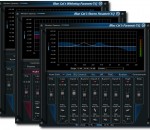
Blue Cat's Parametr'EQ is a 7 bands parametric equalizer combining the advantages of both the digital and analog worlds. Its special non-linear and oversampling features let you easily simulate the compression and distortion that may occur in an analog EQ or on the contrary obtain a very clean and transparent digital EQ. The plug-in includes a low shelf/low cut filter, a high shelf/high cut filter and 5 boost/cut band filters. An optional brickwall limiter has been added to the output to protect your ears and monitors. Its wide range of gain (+/-40 dB per band) and bandwidth (.01 to 5 Octaves) makes it suitable for any equalization task, especially with the extra zooming capability that lets you define your own range for the user interface. The included skins let you choose the layout that best suits your needs, and you can completely customize the user interface thanks to Blue Cat's Skinning language support. The graph displays the computed frequency response of the plug-in, so that you can exactly know how your signal is processed. This is not an approximated or "ideal" response curve based on the controls of the user interface, but the exact computed frequency response of the filter, which makes this plug-in a true WYSIWYG (What You See Is What You Get) equalizer. Thanks to the included Smooth Update technology, every single parameter of this equalizer can be automated in your favorite sequencer or controlled by MIDI in real time (MIDI learn included). You will get an absolutely zipper-free continuous time-varying equalization. Filters activation and bypass functions are now totally smooth and won't damage your ears or speakers. Last but not least, this equalizer has absolutely no latency, which make it perfect for real time applications. FEATURES: · True WYSIWYG 7 bands parametric equalizer · Filters designed after analog circuits · Non linear modeling: add some warmth or analog distortion to each EQ stage · Output brickwall limiter · Output peak meter · Oversampling for optimal sound quality, whatever your sampling rate · 40 dB range for each band with customizable effective range · Automatic gain compensation · No latency · Real time display of the frequency response with precise measurement and zooming capabilities · Window Opacity Control: make the plugin window transparent · Smooth Bypass: activate/deactivate the plugin with absolutely no noise · Undo/Redo · Import/Export presets and share them between the directX and VST versions
Imagia is a non-destructive photo editor. No changes are made to the original photo, no matter what you do with it. This means that you are free to experiment. It means your creativity is not limited by fear of doing something wrong. Imagia has consistent user interface. It always runs fullscreen and the settings are always in the same place. Once you learn it, you will never feel lost. Keyboard use in Imagia introduces new original ideas. Learning Imagia is a pleasure. It is pure fun to see how fast this program runs, how your image within seconds turns into masterpiece and few seconds later you find a setting that makes it even better. There are dozens of settings to change at your fingertips. Not hidden in menus and modal dialogs but just on the left in the main window. If your photo needs straightening or cropping - use Imagia to do it. Global adjustment is a start. Imagia allows user to use brush to change photos locally. Lighten some parts of an image and darken the others, sharpen the eyes and smoothen the skin... Color, black and white, lomo, selective color, dualtoning... There are over 40 settings templates ready after you install Imagia. Each template represents different style. Users can save their own templates and share them online easily. Pick new templates from the gallery on OproLab's web page and download them free. If you use RAW format when you shot your photos you can't pick any image editor. Most of them does not open RAW formats. Imagia has no limits in this matter. Thanks to dcraw developed by Dave Coffin it can open almost any Raw file. When a new camera appears on the market dcraw usualy is first that can open its files. dcrawFront added to Imagia makes using dcraw more intuitive. Edited photos can be easily uploaded to Facebook, Google and Skydrive. Mind you that those photos will have small, discreet IMAGIA watermark on it to encourage you and a your friends to buy full version of IMAGIA. Because of its accurate and fast color matching capability, Mosaizer Pro is used by enthusiasts and professionals all over the world. FEATURES: · Overlays - bitmaps on top of each cell of the photo mosaic to create depth · 32Bit bitmap masks - combine the bitmap overlay and its alpha mask · 3D effects - like shadow, buttons, windows and splat! · A very accurate color matching engine (benchmark quality) · Multiple-language support · Cropping: only render what you want · Multiple file formats: bmp, jpg (jpeg), png, ico, gif, wmf and emf · The Genuine Paintbrush - to literally paint with pictures · Create picture libraries · Use of textures to create additional 3D effects · Edit functionality - to edit parts of the result by search/replace · Single cell mosaizing - to paint a picture by repeatedly using its own bitmap · Pre-processing - make sure the best picture library is used · Post-processing filters (color blending, color correction, tile edit) · Cell colorizing - to better match with the source colours
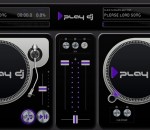
Play DJ is the ultimate turntable experience on Windows 8. Play your music on two turntables and mix them together using the Cross-Fader. Add in sound effects, adjust speed, or cue up a loop to really feel like a DJ.
free watch tv online from world,Watch all Movies and TV shows online for Free. Free live tv online streaming. Internet Videos and online movies of The best internet TV
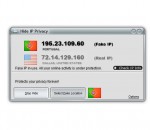
Hide IP Privacy, hides your real location and IP address behind the veil of a proxy server, ensures your real ones inaccessible to hackers, insecure networks, online identity theft, etc., un-ban yourself from forums or chat rooms, and more. Being the most easy-to-use and efficient IP changer, Hide IP Privacy is also excellent in functional strengths such as changing IP address automatically, great compatibility, spam and viruses free, etc.
GOM Media Player The only media player you need - for FREE! Not only is GOM Media Player a completely FREE video player, with its built-in support for all the most popular video and Media Player formats, tons of advanced features, extreme customizability, and the Codec Finder service, GOM Media Player is sure to fulfill all of your playback needs. With millions of users in hundreds of countries, GOM Media Player is one of the world`s most popular video players. Whats New : Added "Touch Setting" feature for touch screen devices. Added "Search box" feature on playlist. (Ctrl+F) Supported "HTTPS URL" for youtube or net radio playback. (Ctrl+U) Added "Music Tap" on preferences related to play music files. Improved performance related to "speed of add & delete" of files on playlist. Other miscellaneous corrections, fixes, and changes
Iperius Backup is one of the best free backup software, also released in commercial editions for those who need advanced backup features for their companies. The freeware version of Iperius Backup allows you to backup to any mass storage device, such as NAS, external USB hard drives, RDX drives, and networked computers. It has comprehensive scheduling and e-mail sending functions. It supports zip compression with no size limit, incremental backup, network authentication and the execution of external scripts and programs.
Maryfi is a free and easy to use software router for Windows 7, 8 , and 8.1 computers. With Maryfi, users can wirelessly share any Internet connection such as: a cable modem, a cellular card, or even another Wi-Fi network. Other Wi-Fi enabled devices including laptops, smart phones, music players, and gaming systems can see and join your Maryfi hotspot just like any other Wi-Fi access point and are kept safe and secure by password-protected WPA2 Encryption.