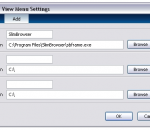
Use Browser View for just IE (using IE single-line menus and standalone toolbar button) or for multiple browsers (using multiple-browsers drop-down menus and drop-down toolbar button). Browser View file size is only 21.5 KB. Right-click Firefox bookmarks to open directly in IE, Chrome, or any other browser-- without the need to first open, and then close, the bookmarked web page in Firefox. Browser locations, and related menu text, are determined automatically, from a search of the Windows Registry. Users may also manually modify these browser locations, or enter additional or portable browsers.
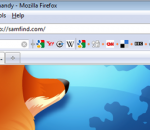
The samfind Bookmark Bar picks up where Firefox's Bookmarks Toolbar leaves off: - Choose your favorite websites to add to your Bar to get to them quickly, - Easily fit hundreds of websites on the Bar by organizing them into topics, - Integrate your current FF Bookmarks Toolbar websites into your Bar with one click, - Search within websites using their own search engine right from the Bar, - Access website’s RSS feeds at the touch of a button, - Choose which social and bookmarking services to interact with from the Bar: Digg a story, submit to Reddit, save to Delicious, tweet to Twitter, post to Facebook, and Stumble! the web. - Place the Bar where you want: standard toolbar, below the web page, or inline next to the URL, - Show favicons only, text only or both favicons and text, - Access your Bookmarks with our hot-key system, - Synchronize your bookmarks to access them from more than one computer Social and Bookmarking services include: StumbleUpon, Digg, Reddit, Twitter, Facebook, Delicious, LinkedIn, TinyURL, MySpace, Bloglines, Blogmarks, FriendFeed, Furl, Google Bookmarks, Live, Magnolia, Mixx, Propeller, Slashdot, Technorati, Yahoo! Bookmarks, Yahoo! Buzz, Sphinn, BallHype, bit.ly, BlinkList, Connotea, Current, Diigo, DZone, Fark, Faves, FoxieWire, Google Reader, Health Ranker, Kaboodle, Kirtsy, MyAOL, Netvouz, Newsvine, Plurk, Simpy, Sphere, Spurl, Streakr, Stylehive, Tailrank, Tipjoy, Truemors, Tumblr, Twine, Xanga, Yahoo! MyWeb and Y Combinator. Add ANY WEBSITES YOU WANT or quickly add pre-formatted topics and websites, like: – SEARCH: Google Search, Yahoo, MSN, Wikipedia, Mahalo, and more... – NEWS: Google News, Digg, Reddit, New York Times, WSJ, BBC, CNN, Delicious, and more ... – REFERENCE: Dictionary.com, Encyclopedia.com, Ninja Words, Rhyming Dictionary, and more ... – BANKS: Wells Fargo, Bank of America, Citibank, Paypal, WaMu, and more ... – MAPS: Google Maps, Yahoo Maps and Google Transit –EMAIL: Gmail, Hotmail and Yahoo Mail
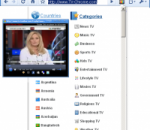
Chrome TV lets you stream international TV stations to your desktop via a browser pop-up inside Google Chrome. It draws its listings from an online database, which means you can't add your own channels or make other changes. Chrome TV's selections are nothing if not diverse--linguistically and geographically, at least. The programming leans toward news, weather, and sports broadcasts as well as what might be called cultural affairs programming, though we did find some movies, classic cartoons, and other pleasant surprises. Chrome TV is free and installs easily, but it might require the Windows Media Player browser plug-in, which is also free. This plug-in was intended for Firefox, and it's listed for Vista, but it works in the latest version of Chrome, too, and we had no problem running it in Windows 7 64-bit. Chrome TV's extensions page had some useful support information but no configuration options to speak of.
The Amazing IE Extension is an add-in for the standard Internet explorer.It's simple to install.Just download it.As well as displaying a completely new look and feel,the main Amazing IE Extension bar doesn't get in your way like the standard internet explorer bar does.Simply drag it where you want it! Discover a re-designed much more efficient favorites system.This is much easier to use than the standard Internet Explorer favorites,and also features a built-in text editor for each favorites folder! Use features such as Notification to set reminders to visit a page,open an application and even set an alarm clock! Use the built-in Calendar and keep track of your schedule in an internet fashion. Use the quick link viewer for easier access to your favorite url's. When necessary,toggle back to the standard Internet explorer bar.The Amazing IE extension has a lot to offer.Give it a shot!
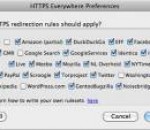
HTTPS Everywhere is a Firefox extension produced as a collaboration between The Tor Project and the Electronic Frontier Foundation. It encrypts your communications with a number of major websites. Many sites on the web offer some limited support for encryption over HTTPS, but make it difficult to use. For instance, they may default to unencrypted HTTP, or fill encrypted pages with links that go back to the unencrypted site.
Shareaholic is the better, quicker, easier way to share, e-mail, tweet, and bookmark stuff you care about online with friends, family, and co–workers. If you like to connect and share with people in your life using any service like Facebook, Email, Twitter, etc, you'll likely love Shareaholic. Shareaholic makes online sharing better, faster and easier. Once you have Shareaholic, you'll be able to simplify your online social life. Share links, videos, blogs, images with services you already use like Facebook, Twitter, Digg, LinkedIn, Gmail, Yahoo, and more. No need to sign up for yet another service or account. You can now find the freshest news, videos and blogs as they emerge on the realtime web within Shareaholic and easily share that on any of your social networks. No more toolbars, buttons or bookmarklets piling up in your browser for every site you use, and no more looking for web publisher provided buttons. Shareaholic is the only tool you need to share.Use Shareaholic on your terms. Quick, clean, and to the point.We're fanatical about user experience, design, and improving Shareaholic for our users. We continue to improve Shareaholic based on your valuable feedback. Both Mozilla and Microsoft recommend our products. Your privacy is critically important to us. Shareaholic protects and maintains your online security and peace of mind. This means that it will not display unwanted and intrusive advertising, or allow any malware or spyware to operate - period. We hate spam too.
This extension displays a timer in the status bar to monitor the countdown and the duration of Space Shuttle missions. Features 2 timer types: Launch Landing 4 timer modes: Standard Classic Reduced Standard Only days Data auto-update every 5 minutes (work done in "background"). Left click function: popup with some information about the mission. Central click function: popup to change the timer type and mode. Right click function: context menu. Change of the timer style and appearance of popups in occurrence of some events: "SCRUB" Beginning of final countdown (-9 minutes) Beginning of automatic launch sequence (-31 seconds) Lift-off MECO (Main Engine Cutoff) / Achievement of preliminary orbit Stable orbit insertion Deorbit Burn / Exit from stable orbit Entry Interface / Re-entry into dense atmosphere Landing
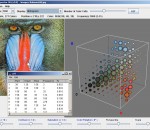
Color Inspector 3D is a Firefox extension designed to enable you to view the colors of a picture in a RGB-color cube. When the user right clicks on an image, the option "show Color Inspector with Image" is shown in the context menu. If the user selects this option a new window is opened which shows the color cube of the image. The cube can be rotated by dragging over the image. When the user moves the mouse over the thumbnail of the image whose color cube is shown, a marker will be placed on the position of the current color in the color cube and additional information about this color will be shown. For larger images, the source image will be scaled down before the color cube is generated, which allows faster generation and rendering of the color cube. This option can be changed or modified in the preferences window of the addon. By default, only the empty frame of the color cube is drawn while the user rotates the cube. Only after the rotation is finished, the colors are drawn as well. This is necessary, for better performance, as the drawing of the colors takes a little time which does not allow for a smooth rotation of the cube. This option can also be turned off in the preferences window of the addon.
If you're not happy with the default skin of Google Chrome, you can download alternative theme files. Go to ChromoFans and look for something you like. Here's a Burlywood Google Chrome Theme, you can free download it to enhance your Chrome Browse. Install Burlywood Google Chrome Theme 1. Download Burlywood Google Chrome Theme first. 2. Uncompressed the zip file to your local folder. Each zip file contains two files: the Google Chrome Theme file called "default.dll" and help document called "readme.htm" 3. Close Google Chrome if you haved launched it. 4. Replace your original default.dll(I suggest you make a backup of the original first). Here's the path where you need to replace the file: * In Vista: C:/Users/[your user name]/AppData/Local/Google/Chrome/Application/[current version]/Themes/ * In Windows XP: C:/Documents and Settings/User/Local Settings/Application Data/Google/Chrome/Application[current version]/Themes/ 5. Restart your Google Chrome.
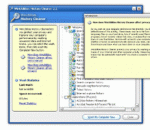
Mozilla Firefox plug-ins for WinUtilities History Cleaner How to use this plug-ins? 1. Download and install our WinUtilities suite 2. Unzip the downloaded file to your WinUtilities plug-ins folder 3. Run WinUtilities History Cleaner 4. Check the 'Erase Mozilla Firefox cookies & recent history' option in list 5. Click Erase Now button on the bottom of main window
Firesay is a Firefox extension designed to enable a more intuitive and efficient way to navigate web content. It complements traditional navigation methods with voice-based navigation. Say your search queries instead of typing them. Say which sites you want to visit instead of typing URL addresses. Say "Firesay, share on Facebook" to share any page on Facebook.
Adobe Shockwave Player Over 450 million Internet-enabled desktops have Adobe Shockwave Player installed. These users have access to some of the best content the Web has to offer - including dazzling 3D games and entertainment, interactive product demonstrations, and online learning applications. Shockwave Player displays Web content that has been created using Adobe Director.