Get ready for the 2010 MLS season with the Columbus Crew Internet Explorer browser theme - follow all the action with this custom browser theme for IE. Capture the excitement of MLS soccer right in your Internet Explorer browser. Includes an un-installer.
Blocks Pop-up Ads, Flash Ads and Banners Pop-up ads are a form of online advertisements on the World Wide Web intended to attract web traffic. Nowadays, pop-ups are used maliciously by some advertisers to install spyware, adware, Trojans and other potential threats. Anvi Ad Blocker will help you block these ads efficiently. Some annoying advertising banners that appear inside web-pages might harm your computer, the banner blocker can be easily enabled to block banner ads. Blocks Malicious, Phishing and Unwanted Ads Anvi Ad Blocker helps you from phishing ads, which may steal your logins and passwords, and other types of misleading or malicious pop-ups. Spyware or malware comes in many forms of unwanted ads, and Anvi Ad Blocker serves well as a guard to prevent your PC from spyware or unwanted software. Frequent Database Update New forms malware comes daily, to prevent them effectively, Anvi Ad Blocker keeps up with the latest threats and integrates them into database for quick block. Before starting up, Anvi Ad Blocker will retrieve the latest database from Anvi Cloud server, and it may take few seconds for blocking emerging ads.
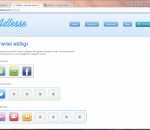
Less ads - more choice! Adlesse replaces animated banners with useful widgets of your choice. Follow your Twitter and Facebook friends, view weather forecasts and read interesting news instead of watching ads! Adlesse substitutes annoying banners for useful widgets of the same size. Currently, you can substitute ads for several types of info-boxes: current weather conditions and detailed forecast for your region, local news headlines, interesting facts, famous quotes, updates from your Twitter feed as well as Facebook wall and interesting links shared by your friends. Less ads - more browsing power! Use the reconquered ad space to stay tuned for your friends` latest tweets as you browse Facebook. While googling, get more results for your queries from Wikipedia, Bing and Twitter in place of Google ads. Less ads - more control! Unlike other ad filters (such as Adblock) Adlesse only hides ads, but doesn't prevent them from being loaded. With only one click you can see the ad hidden under any particular widget. It prevents you from losing access to the important parts of the page (such as flash games) by mistake. Also unlike AdBlock Adlesse doesn't block non-intrusive text ads (such as text AdChoices by Google) that most people find helpful. Enjoy more diverse surfing with Adlesse for Windows. It is compatible with every popular browser: Internet Explorer, Opera, Firefox, Safari and Chrome.
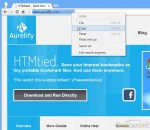
HTMtied instantly converts any Internet address (link, URL, bookmark, favorite) to a very small HTML file that when opened in any browser, it will automatically load that address. Use it when you want to save an Internet address for future use on your computer, tablet, smartphone, web storage, Windows, Mac, Android, iOS, etc. Using HTMtied is easy as 1, 2, 3. Step 1: Copy the Internet address from your browser's address bar or from any link to the Clipboard. Step 2: Run HTMtied (from the Desktop, Start Menu, or better yet, from a shortcut key you define). HTMtied will automatically convert that address to a linking HTML file and copy the file to the Clipboard. Step 3: Simply paste the file anywhere you want. Starting with Version 2.0, HTMtied supports conversion of links en masse: copy any number of Internet addresses on separate lines to the Clipboard or drag and drop any number of URL files over HTMtied, and linking HTML files will be created for each address. There is also the new Direct Mode, a special HTMtied shortcut that, when clicked, it will automatically save all the link HTML files to a directory of your choosing (Documents, Dropbox, etc.). HTMtied is so easy to use that it doesn't even need a user interface: if everything goes well, the famous "Tada" sound is played. On failure, an error sound is played. HTMtied can also be downloaded and run directly, without installation. Windows and Internet Explorer can save Internet addresses to URL files. However, URL files are not a standard and cannot be used across different platforms. Linking HTML files created by HTMtied work anywhere. And yes, HTMtied can convert URL files to linking HTML files: simply copy the URL files on the Clipboard and run HTMtied. Or drag and drop the URL files over the HTMtied icon.
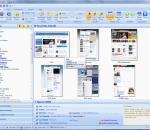
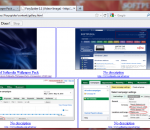
Peek-A-Boo Favorites is a Visual Bookmark Manager that takes a snapshot image of each bookmark allowing you to preview the web site before visiting it. It will monitor your favorite bookmarks and notify you when the web page content has changed by a thumbnail preview image. You can schedule individual bookmarks to check for page content changes from several minutes to several months. You can then view the updated text differences line by line. Peek-A-Boo Favorites supports Bookmarks in Internet Explorer, Firefox and Google Chrome browsers all at the same time with out having to import any bookmarks. You can manage these bookmarks without importing or exporting the bookmarks. It will also detect duplicated links and dead links allowing you to either delete them or updated them. You can text search across your favorite pages content. You can sort your favorites by folder, A to Z listing, web site or by Tag. Schedule automated backups of your bookmarks. It has extensive tracking of each bookmark including Last date visited, Last updated page content, Visited count, Web Site GEO location (City/Country) and a Star Rating indication. Join the Peek-A-Boo Community Library of bookmarks to share your bookmarks and get the most popular bookmarks based on your search criteria. Subscribe to Bookmark lists of Top Rated Web Sites i.e. Top Visited by Country. The fully licensed version of Peek-A-Boo Favorites provides an Online Account to store multiple computer favorites. It also allows you synchronize your favorites to a USB drive with the application Peek-A-Boo Junior a simplified version of Peek-A-Boo Favorites.
QuickTumble is an easy-to-use Safari extension that will provide you with a rapid solution for posting text, photos, links and more on Tumblr. Currently it offers: · Toolbar button - toggles bar with shortcuts to add different media types to tumblelog (text, photo, link, etc.) · Tumble Link to this Page context menu for quick posting links to currently browsed page · Tumble Selection as Quote context menu for quick posting selected text on visited page as quote. FEATURES: toolbar button easy posting and dashboard access context menus posting test, quotes, images, etc. by clicking on it Tumblr integration simple sign in to your account support for multiple tumblelogs work log, home log, love log - everything at your fingertips!
Instead of embarking on a grueling journey of scrolling to find the images you want, FoxySpider makes the trip much easier. This Mozilla Firefox add-on scans Web pages and creates thumbnail galleries of all of the page's images and their respective links. It also fetches other content such as audio and video files, which you configure under the "content" tab in the extension preferences. FoxySpider is a great tool for anyone who enjoys perusing through the many pictures that the Internet has to offer. The add-on improves on image search engines such as Google and Bing by scanning pages of images instead of pulling up singular images based on your search criteria. Of course, they can be used for different purposes. Use them in conjunction with each other to get the most out of your image browsing experience. The add-on is especially great for blog-browsing as you get all the images without the endless scrolling. With FoxySpider you can: Get all photos from an entire website Get all video clips from an entire website Get all audio files from an entire website Well, actually get any file type you want from an entire website FoxySpider can be used to create a thumbnail gallery containing links to rich media files of any file types you are interested in. It can also crawl deep to any level on a website and display the applicable files it found in the same gallery. FoxySpider is useful for different media content pages (music, video, images, documents), thumbnail gallery post (TGP) sites, podcasts. You can narrow and expand the search to support exactly what you want. Once the thumbnail gallery is created you can view, download or share (on Facebook and Twitter) every file that was fetched by FoxySpider.
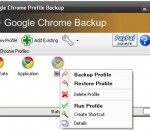
Google Chrome (web browser) has just hit the world. Google Chrome backup is a small tool to backup and restore Google Chrome profile. The profile holds personal data like history, bookmarks, etc. For easier usage, there is also a Wizard, for advanced users Google Chrome Backup has password protection for backup files and compression ratio. Everything is done with one click. Latest feature includes synchronization with Google Bookmarks service and bookmarks export. 1. You need Google Chrome installed in order for this tool to work. It supports 0.2.149.27 version of Google Chrome or newer. 2. Select a profile from drop down list and manipulate profile by selecting options on "Profile Tools" menu. 3. To backup current profile click "Backup" menu from "Profile Tools" and select a backup path. A new file which holds your profile is created. 4. To restore the old profile, click on "Restore" menu from "Profile Tools" and navigate to *.gcb file you want to restore. Selected profile will be deleted and restored from the backup file. 5. Create new Google Chrome profiles and create shortcut on desktop. 6. Delete Google Chrome profiles. 7. Add Google Chrome profiles to Google Chrome backup tool.
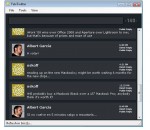
For a way to access all your Twitter feeds and messages without opening the Twitter main interface, TeleTwitter is the application to have. Installation of the software is a breeze and it is quite non-intrusive as you will notice. Indeed, TeleTwitter works as a desktop Twitter client that you can load anytime you want. Its interface is very neat and accompanied by graphics that you will love. Posting and reading messages are two more features that can be accessed from your desktop. Once TeleTwitter has been loaded, it can be minimized to the system tray. The desktop application can also be configured to send you notifications regarding your postings. The size of this application is another asset you will enjoy. This is without a doubt a better alternative to opening a Twitter page.
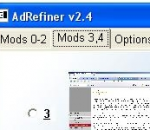
AdRefiner is a small, effective, and intelligent AntiAd software product that can hide annoying ads without human intervention. This surfing companion features a smart engine that can identify possible animated ads and cover them. AdRefiner does not monitor internet connection, and there is absolutely no chance, not to get all data from internet, while using it. It monitors what happens on screen while browsing, and creates cover windows as it recognizes animated ads. It is an image processing, stand alone application and can work with any browser. If you think that ads can be useful, but you just hate ads which screams at you and if you are not fond of idea that you should install, yet another, application which monitors yours internet connection then you should try AdRefiner.
With this extension you can disable the newly introduced Chat Sidebar and return to the old good normal Facebook Chat. There are also other features, check them below! · Disable the Chat Sidebar and return to the Old Normal Chat. · Use Friend Lists to limit your availability and group your Chat contacts. · Link the name in chat windows titlebar to contact's profile. · Revert the blue top bar to the old style one. · Stick the blue top bar at the top of the window. · Add a shadow below the blue top bar. · Hide the ticker in the home page and/or inside games. · Enable or disable extension features via a settings panel.
Adobe Shockwave Player Over 450 million Internet-enabled desktops have Adobe Shockwave Player installed. These users have access to some of the best content the Web has to offer - including dazzling 3D games and entertainment, interactive product demonstrations, and online learning applications. Shockwave Player displays Web content that has been created using Adobe Director.