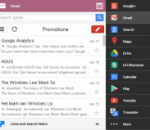
Quickly search almost everything google is capable of - get easy access to the most commonly used google services, available at any time. This extension is meant to be a replacement for both, iGoogle and the quickly removed google menu. This extension contains an extensive menu of google services. You can access them by browsing through the black menu entries. By clicking the menu entry of your choice, you'll go to the corresponding google service in a new tab. Easily share or plusone the current page you are viewing via Black Menu for Google, check you google+ notifications or even create a new post right in Black Menu for Google. This page also includes a searchbox. The results will open in a new tab. You can also filter you search query by using one of the filters in the "links and search filters" menu. That menu also contains links to the different Sections of Google+, like Communities, Circles, and Games. This page includes a almost full featured gmail inbox. You can view every label, compose an email, mark a mail as spam, it even has multiple-account support! You can also search for email and get the results right into Black Menu. You can also click one of the searchfilters in the "links and searchfilters" menu, which will open a new tab with your search results in Gmail. When you have nothing entered in the search box, the links in the "links and searchfilters" items will link to those labels in gmail. This page also Includes a link to google contacts, and a link to create a new contact.
YouTube5 has become far more popular than I ever imagined it would! I’d like to say a general thank you to everyone who has commented to make suggestions or just express appreciation for this extension, its a great encouragement to know it has been useful to so many people.
Press PrintScreen and can't grab the entire webpage because it is longer than the browser window? You need FireShot! Unlike other extensions, this plugin provides a set of editing and annotation tools, which let users quickly modify captures and insert text and graphical annotations. Such functionality will be especially useful for web designers, testers and content reviewers. Screenshots can be saved to disk (PNG, GIF, JPEG, BMP), printed (NEW), copied to clipboard, e-mailed and sent to external editor for further processing. A free image hosting web-server is also provided.
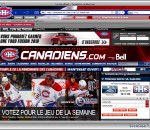
This is for the fan of NHL's Montreal Canadiens or just someone that loves a great looking hockey theme! Includes links to the Canadien's site, up-to-date videos in the sidebar and more! SEARCH Upon launch, we will switch your default search engine to BING. You can easily switch to another search provider but we think you will enjoy the BING search experience. PRIVACY: We respect your privacy. We do track some data - but it`s only numbers. We follow the total number of active themes, clicks on the extension buttons and themes using our search partners. That`s it. Nothing is personally identifiable and nothing is on an individual basis. The full legal description is at brandthunder.com/eula if you`d like extra assurance. UNINSTALL: We hate to see you go but if you want to uninstall, simply go to Tools - > Addons -> Extensions and select Uninstall. ABOUT US: Brand Thunder works with leading brands to develop custom Firefox add-ons. We have worked with the leading social networks, sports teams, news publishers, entertainment and gossip sites, colleges, blogs, music as well as our own themes for football, baseball, soccer and the holidays - lots of exciting partners are on the way, so stay tuned! STAY IN TOUCH: Get the latest on new partners, updates and more through our feeds: www.brandthunder.com/feed and www.twitter.com/brandthunder
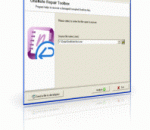
OneNote Repair Toolbox is the best solution to repair corrupted OneNote page and files. It is simple to download and install (with full after sales support) and we guarantee all file recoveries. Managed by a simple, user-friendly interface, you can view repair data before saving, save data to disk as separate files and is the most effective solution to repair corrupt OneNote pages. For OneNote fast repair, download OneNote Repair Toolbox today!
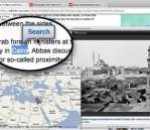
Apture Highlights is a Firefox add-on designed to combine the power of Google search and the richness YouTube, Flickr, Twitter to perform amazing searches. Just highlight a phrase on any site to reveal the web’s best content without ever leaving the page. Fast, powerful, and fun.
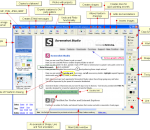
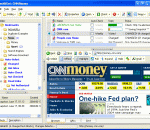
Check&Get; is a powerful Bookmark Manager, Web Change Monitor, Web Capture Tool and Web Page Archiver. It manages your browser bookmarks, makes scheduled visits to web sites to look for changes, and retrieves and highlights the changed contents. Each time Check&Get; detects changes in a web site that it is monitoring, the program automatically captures the web page, highlights the changes and can notify you of changes via e-mail. Alternatively, the program can deliver a pop-up alert window, or play a sound file to alert you about the change. With its internal browser, Check&Get; lets you look at your saved web pages, even when you're not connected to the Internet or the page no longer exists on the Web. You can use the program's auto-saving feature to collect snapshots of prior versions of web pages, allowing you to study and document the changes in web sites over time. Check&Get; has powerful, built-in bookmark management functions. You can search bookmarks by their names, descriptions, or keywords. Lists of URLs can be imported from any browser or Office document, and added to your bookmarks. Check&Get; cleans duplicate bookmarks and eliminates inactive links, so your list of web sites is always fresh and accurate. You can turn your list of bookmarks into an unlimited number of collections, and schedule web searches by collection. Check&Get; works with Internet Explorer, FireFox, Mozilla, Opera, and most popular Windows browsers, allowing you to open bookmarks, as well as import, export, and synchronize them. Whether you are a business person who needs to know what price changes your competitors have made in their online catalogs, a researcher who needs to be alerted when web site content has changed, a student who is following a breaking news story, or a home user who wants to see what his or her favorite sports team or Hollywood star is doing, Check&Get; has the tools that you need.
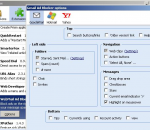
Block ads on the right hand side of the screen when using Yahoo Mail, Hotmail, Outlook.com and Gmail thereby expanding your message… Removes the ads and sponsored links and squeezes out the empty space left behind by other ad blockers to give you more room to write your messages. For Gmail users: You can choose to remove the People Widget in the options. Great for parental control to child proof those ads. There are also options to hide various other items on your Google Mail page to make it more zen.
When loading Grooveshark, a proxy is used to load the main page. After loading, the proxy is removed so you have access with full performance. You don't have to click any button, you can simply visit Grooveshark like you always would. Other Addons that use Grooveshark will continue to work. Grooveshark Unlocker now gets new proxies from the web. The list is updated every time you start Firefox, after 3 hours or by refreshing the list manually in the settings. Sometimes a proxy does not let you access Grooveshark. Just try again and another proxy will be used. You may want to refresh the proxy list or use a proxy of your own. Also you should not need to refresh the page anymore to bypass the blockade. Works now with Grooveshark Mobile and Preview, too!
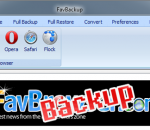
FavBackup is a simple solution for you to backup and restore web browser settings and other data on Windows 7/Vista/XP/2000 systems. No installation required.
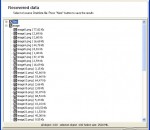
OneNote Repair Toolbox is the market leading .ONE file repair solution available today. Using OneNote Repair Toolbox, users can enjoy the simple, user-friendly interface and feature-rich functionality which makes recovery of damaged or corrupted Microsoft OneNote files, images, audio and text files as simple as 1-2-3! OneNote Repair Toolbox is able to read corrupted .ONE files within Microsoft OneNote and supports all versions of Microsoft OneNote 2003 through to 2007. Now you can repair images, repair audio files, repair text with ease and speed using our simple on-screen wizards and guides. You can save repair data to a separate disk and view repair data before saving, providing you with maximum control over the recovery process and the data you wish to save and restore. For OneNote fast repair, you should look no further than OneNote Repair Toolbox - the ultimate OneNote file repairing tool available today. All you need to do is download OneNote Repair Toolbox and install it on your PC - we also provide full installation and after sales support, which also singles out OneNote repair Toolbox as different from the competition - this is a serious tool to repair OneNote files from .one files for all versions of Microsoft OneNote 2003 and 2007. Powered by the dual combination of a powerful error detection engine matched with an error database which work together to uncover file errors, identify them and proceed to deliver the appropriate recovery protocol. The process is managed by a simple, user-friendly interface which uses easy to understand wizards and on-screen guides. The recovery process provides OneNote fast repair and is the easiest way to repair audio files, repair images and repair text files. OneNote Repair Toolbox is also feature-rich and offers a high level of functionality which also includes the ability to preview repaired files and data as well as to selectively save restored data, providing the user with full control over - download today!
Mozilla Firefox is a graphical web browser developed by the Mozilla Corporation, and a large community of external contributors. Mozilla Fire Fox protects you from viruses, spyware and pop-ups. Enjoy the improvements Mozilla Firfox offers to web browsing performance, usability, privacy and security. Mozilla Firefox is 100% free and is rated the best web browser by many reliable sources. Block annoying pop-ups Firefox blocks pop-ups automatically. Google Search Toolbar Search Google with ease using a unique enhanced suggestion search. Tabbed Browsing Speed up web browsing by viewing more than one web page in a window. Solid Security.
Adobe Shockwave Player Over 450 million Internet-enabled desktops have Adobe Shockwave Player installed. These users have access to some of the best content the Web has to offer - including dazzling 3D games and entertainment, interactive product demonstrations, and online learning applications. Shockwave Player displays Web content that has been created using Adobe Director.
Explore the Chrome Browser Chrome is a fast, simple, and secure web browser, built for the modern web. Speed Chrome is designed to be fast in every possible way. It's quick to start up from your desktop, loads web pages in a snap, and runs complex web applications lightning fast. Simplicity Chrome's browser window is streamlined, clean and simple. For example, you can search and navigate from the same box and arrange tabs however you wish -- quickly and easily. Security Chrome is designed to keep you safer and more secure on the web with built-in malware and phishing protection, auto-updates to make sure you have all the latest security fixes, and more. Privacy Chrome puts you in control of your private information while helping protect the information you share when you’re online. Customization There are tons of ways to customize Chrome and make it yours. It's easy to tweak your settings and add apps, extensions, and themes from the Chrome Web Store. Signing In Signing in to Chrome brings your bookmarks, history, and other settings to all your computers. It also automatically signs you in to all your favorite Google services. More