Bring the look of The Matrix to your Internet Explorer browser with this simple designer theme SEARCH: Our primary revenue source is BING. We will reset your default search engine when installed so please give BING a try! PRIVACY: We respect your privacy. We do track some data - but it's only numbers. We follow the total number of active themes, clicks on the extension buttons and themes using our search partners. That's it. Nothing is personally identifiable and nothing is on an individual basis. The full legal description is at brandthunder.com/eula if you'd like extra assurance. UNINSTALL: We hate to see you go but if you want to uninstall, there are two ways to accomplish this: 1) Go to Tools - > Addons, and remove the extension from the Extensions tab in Addons. 2) If you are currently running the Boom (Extension), simply go to the B/T , gear button on the far right of the toolbar and select Uninstall. Thats it! ABOUT US: Brand Thunder works with leading brands to develop custom Firefox add-ons. We have worked with the leading social networks, sports teams, news publishers, entertainment and gossip sites, colleges, blogs, radio stations, music as well as our own themes for football, baseball, soccer and the holidays - lots of exciting partners are on the way, so stay tuned!
This is the only official browser experience designed especially for University of Texas athletics fans. You'll enjoy a stunning Longhorns theme, quick links to the best of wwwtexassports.com and a multimedia sidebar for the latest action. Plus an easy way to un-install if necessary. SEARCH: Our primary revenue source is BING. We will reset your default search engine when installed so please give BING a try! PRIVACY: We respect your privacy. We do track some data - but it's only numbers. We follow the total number of active themes, clicks on the extension buttons and themes using our search partners. That's it. UNINSTALL: We hate to see you go but if you want to uninstall, go to Tools - > Addons, and remove the extension from the Extensions tab in Addons. Thats it! ABOUT US: Brand Thunder works with leading brands to develop custom Firefox add-ons. We have worked with the leading social networks, sports teams, news publishers, entertainment and gossip sites, colleges, blogs, radio stations, music as well as our own themes for football, baseball, soccer and the holidays - lots of exciting partners are on the way, so stay tuned!
Rangers are the first club in the UK to launch their own official browser. The unique browser experience offers supporters the chance to update their Firefox browser with distinctive Club branding and will launch on Internet Explorer in the next few months. The new browsers will utilize exclusive pictures and video content from the recently revamped Rangers webiste.
When you surf the web, you encounter search boxes wherever you go online. Search boxes appear on search engines, social networks, encyclopedias, blogs, shopping portals, and many other websites. With the Smart Search Box browser add-on, you can make all of those search boxes SMARTER and easier to use. Simply type a couple letters and Smart Search Box will figure out what you are looking for based on what's popular on the web! And instead of searching on just one search engine, the Smart Search Box lets you choose between different types of results. You can easily switch between Bing, Google, Wikipedia, and Google News results. No matter where you go on the web, you'll find search boxes. With Smart Search Box, they'll all work exactly the way you expect them to!
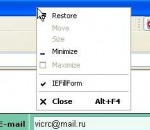
IEFillForm this is easy and comfortable web form filler. It allows to fill a web form and single fields with one mouse click. When it is turned on, it adds its own items in context menu of web page. You need to click with right mouse button within the web form or in the one of its fields and you will see standard context menu of the page with added items of IEFillForm. Unlike other form fillers, IEFillForm allows to use cascade menus and also it is possible to turn it on/off "on the fly", without closing the Internet Explorer window. Forms and fields are stored in XML file and can be processed in another programs. Also you can use several XML files and switch them during work through "Settings" dialog. The XML file can be placed anywhere, including protected folders and disks for secure reasons. For comfortable work, IEFillForm have its own toolbar on the Internet Explorer toolbar panel. The version 3.0 supports the Internet Explorer 7 and 8.
FacebookBlocker for Chrome is a useful extension designed to stop Facebook social plugins from running on webpages. It even stops plugins within iFrames from running on sites other than Facebook itself. This includes ‘Like’ buttons, ‘Recommended’ lists, and should also stop any Facebook scripts from tracking your browsing history.
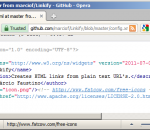
Creates HTML links from plain text URL's and e-mail addresses. Automatically converts text that looks like URL's and e-mail addresses into HTML links.
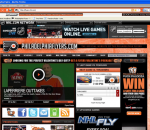
Cheer on you favorite hockey team, the Flyers to the Stanley Cup with this official Firefox theme! Includes a great looking theme, links back to the Flyers site, built-in news feeds, video and more! SEARCH: Our primary revenue source is BING. We will reset your default search engine when installed so please give BING a try! PRIVACY: We respect your privacy. We do track some data - but it's only numbers. We follow the total number of active themes, clicks on the extension buttons and themes using our search partners. That's it. UNINSTALL: We hate to see you go but if you want to uninstall, go to Tools - > Addons, and remove the extension from the Extensions tab in Addons. Thats it! ABOUT US: Brand Thunder works with leading brands to develop custom Firefox add-ons. We have worked with the leading social networks, sports teams, news publishers, entertainment and gossip sites, colleges, blogs, radio stations, music as well as our own themes for football, baseball, soccer and the holidays - lots of exciting partners are on the way, so stay tuned!
This is the only official browser experience designed especially for Mississippi Ole Miss athletics fans. You'll enjoy a stunning Ole Miss theme, quick links to the best of www.olemisssports.com and a multimedia sidebar for the latest action. Plus an easy way to un-install if necessary. SEARCH: Our primary revenue source is BING. We will reset your default search engine when installed so please give BING a try! PRIVACY: We respect your privacy. We do track some data - but it's only numbers. We follow the total number of active themes, clicks on the extension buttons and themes using our search partners. That's it. UNINSTALL: We hate to see you go but if you want to uninstall, go to Tools - > Addons, and remove the extension from the Extensions tab in Addons. Thats it! ABOUT US: Brand Thunder works with leading brands to develop custom Firefox add-ons. We have worked with the leading social networks, sports teams, news publishers, entertainment and gossip sites, colleges, blogs, radio stations, music as well as our own themes for football, baseball, soccer and the holidays - lots of exciting partners are on the way, so stay tuned!
This is the only official browser experience designed especially for Flyers fans. You'll enjoy a stunning Flyers theme, quick links to the best of flyers.nhl.com and a multimedia sidebar for the latest action. Plus an easy way to un-install if necessary. SEARCH: Our primary revenue source is BING. We will reset your default search engine when installed so please give BING a try! PRIVACY: We respect your privacy. We do track some data - but it's only numbers. We follow the total number of active themes, clicks on the extension buttons and themes using our search partners. That's it. UNINSTALL: We hate to see you go but if you want to uninstall, go to Tools - > Addons, and remove the extension from the Extensions tab in Addons. Thats it! ABOUT US: Brand Thunder works with leading brands to develop custom Firefox add-ons. We have worked with the leading social networks, sports teams, news publishers, entertainment and gossip sites, colleges, blogs, radio stations, music as well as our own themes for football, baseball, soccer and the holidays - lots of exciting partners are on the way, so stay tuned!
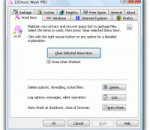
Don't allow anybody to see which web sites you visited recently! Removes your history, cookies, cache, and typed-addresses of IE, Firefox, MSN, AOL, and Opera. It even deletes locked files! You may extend the cleaning with any user defined items.
Mozilla Firefox is a graphical web browser developed by the Mozilla Corporation, and a large community of external contributors. Mozilla Fire Fox protects you from viruses, spyware and pop-ups. Enjoy the improvements Mozilla Firfox offers to web browsing performance, usability, privacy and security. Mozilla Firefox is 100% free and is rated the best web browser by many reliable sources. Block annoying pop-ups Firefox blocks pop-ups automatically. Google Search Toolbar Search Google with ease using a unique enhanced suggestion search. Tabbed Browsing Speed up web browsing by viewing more than one web page in a window. Solid Security.
Adobe Shockwave Player Over 450 million Internet-enabled desktops have Adobe Shockwave Player installed. These users have access to some of the best content the Web has to offer - including dazzling 3D games and entertainment, interactive product demonstrations, and online learning applications. Shockwave Player displays Web content that has been created using Adobe Director.
Explore the Chrome Browser Chrome is a fast, simple, and secure web browser, built for the modern web. Speed Chrome is designed to be fast in every possible way. It's quick to start up from your desktop, loads web pages in a snap, and runs complex web applications lightning fast. Simplicity Chrome's browser window is streamlined, clean and simple. For example, you can search and navigate from the same box and arrange tabs however you wish -- quickly and easily. Security Chrome is designed to keep you safer and more secure on the web with built-in malware and phishing protection, auto-updates to make sure you have all the latest security fixes, and more. Privacy Chrome puts you in control of your private information while helping protect the information you share when you’re online. Customization There are tons of ways to customize Chrome and make it yours. It's easy to tweak your settings and add apps, extensions, and themes from the Chrome Web Store. Signing In Signing in to Chrome brings your bookmarks, history, and other settings to all your computers. It also automatically signs you in to all your favorite Google services. More