ALLPlayer is probably the most popular program for watching movies with matching subtitles. FEATURES: It plays all known media formats, RAR files, and futhermore has an implemented LiveUpdate function to update the latest codecs if there is a problem with opening a movie file. The program also searches for matching subtitles in all languages automatically. Intelligent Subtitles keeps the subtitles on the screen for the period of time needed for you to read them. AVI Doctor helps when you are downloading a torrent file and want to preview the movie. With AVI Doctor you can also fix broken files. With LiveUpdate you will get access to many additional software and functions. Unlike most players, ALLPlayer is not merely an overlay for MediaPlayer, and it uses DirectX, which makes it possible to play any movie. The program is also integrated with a speech synthesizer application, allowing you to watch movies with subtitles with a reader (dubbing). Most popular formats such as DivX, XviD, MP3, and AVI, FLV, MP4, 3GP, MKV, M2TS, MPG, MPEG, RMVB, WMV, QuickTime, MOV, FLAC, APE, and many more less known formats can be played thanks to liveupdate codecs downloader. Other features: DVD support. CD support. The option to preview images from webcams, DV or any other video source such as TV tuner. Two monitors or monitor and TV support. Support for Dolby Surround, SPDIF and 3D audio. PlayList - searching for all movies or music in a specified folder or drive and putting them into a playlist. Ability to choose any audio output, including SPDIF, allowing lossless digital transmission of sound to an amplifier. Subtitles support in all known formats (hh:mm:ss, ASS - Advanced SubStation, SSA - SubStation Alpha, SubRip. SubViewer (1 & 2), MicroDVD, MPL2 , SRT, SMI etc.). DivX Muxer - creates a DivX/XviD file with subtitles in it. Video menu - allows the creation of 3D menus as found on the average DVD. ALLMediaServer DLNA/ALLShare included.
Kernel Video Repair is a powerful tool consist of minimum but result oriented steps. The features of tool makes this tool perform better than other tools available in the market. The software allows the user to save the file at the desired location with browse option using which the user can add the saving location of the repaired video. For more information, visit this site homepage
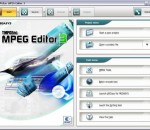
TMPGEnc MPEG Editor 3 is the perfect software to compliment your HDV camcorder and Blu-ray Disc player! Capture your HDV footage and then edit out unwanted scenes with the frame-accurate cut editor. And with its ability to burn to Blu-ray Disc (in BDAV format), you can create your own high definition home videos to archive or share with friends and family! Benefits: Edit Your TV Recordings Import your Windows Media Center recordings (DVR-MS files) or your DVD video recorder files (DVD-Video, DVD-VR) and cut out all the commercials! With Smart Rendering technology, only edited sections are re-encoded, saving you time. You can even import your footage from your DVD-RAM discs, edit them, and burn back to DVD-RAM thanks to the included VRCopy utility. High Definition Editing! Got an HDV camcorder? Hook it up to your computer via an IEEE 1394 / i.LINK port and TMPGEnc MPEG Editor 3 will be able to import your footage easily. In fact, you can edit any HD MPEG-1/2 file and TMPGEnc MPEG Editor 3 will keep it in the same HD quality level with minimal re-encoding. Output as an MPEG file or in the Blu-ray Disc BDAV format for High Definition output*! Enhance Your Video! Besides cut-editing your video, you can add awesome video transition effects between your video clips. There are a whopping 171 transition effects to choose from! You can also apply audio filters such as Audio Noise Reduction, Volume Adjustment and Audio Fade-In/Fade-Out. Burn to DVD or Blu-ray Disc! So you've edited your MPEG video, now what? Why not burn it to DVD or Blu-ray Disc to share with your friends and family? TMPGEnc MPEG Editor 3 allows you to easily author your own DVD complete with menus--no extra software required! If you have a Blu-ray Disc burner, you can burn your video to Blu-ray Disc for easy HD viewing*! Note: *File must be compliant with the desired format. AAC 5.1 audio input support! Dolby Digital 5.1 audio input/output support! NEW! Now you can import (AAC, Dolby Digital) all the explosions, sound effects and music and output (Dolby Digital only) it all in glorious 5.1 surround sound! Features At-A-Glance: * Edit your favorite TV shows and home movies on the frame level without re-encoding the whole video file! * Maintain your High Definition video quality while editing * Burn to DVD or Blu-ray Disc! * Included VRCopy application lets you import from and write to DVD-RAM discs! * Fit-to-disc transcoding makes sure your edited video fits your favorite media * AAC 5.1 audio input support! NEW! * Dolby Digital 5.1 audio input/output support! NEW! * Cut-Edit with surprising ease and speed * Scroll through your video at even higher speeds thanks to DirectX preview rendering! * Capture directly from your HDV camcorder! * Add video transition effects to your clips * Customize your workspace with expandable/collapsable Cut-Edit toolbars! * Full Windows Vista Aero compatibility
Power2Go 9 Essential is FREE burning software. Burn data CDs, DVDs and Blu-ray Discs (even BDXL!) without restriction or limitation. Power2Go 9 Essential is FREE software and does not expire. Power2Go 9 Essential includes our popular Desktop Gadget giving you drag, drop & burn convenience for burning discs. You also get features to create Audio CDs, burn extra-long (90 min/800MB) CDs and copy CDs, non-copy protected DVDs and Blu-ray Discs.
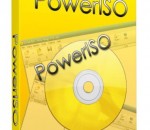
PowerISO is a powerful CD/DVD/BD image file processing tool, which allows you to open, extract, create, edit, compress, encrypt, split and convert ISO files, and mount these files with internal virtual drive. It can process almost all CD/DVD/BD image files including ISO and BIN. PowerISO can be used easily, which support shell integration, context menu, drag and drop, clipboard copy paste. With PowerISO, you can: 1. Open and extract ISO File. 2. Create ISO file from hard disk files or CD/DVD/BD discs. 3. Edit an existing ISO file directly. 4. Convert image files between ISO/BIN and other formats. PowerISO can convert almost all image file formats to a standard ISO format file. 5. Make bootable ISO file, get boot information from bootable ISO file. 6. Make floppy disk image file. 7. Optimize files to save disk space while saving ISO file. 8. Mount ISO file with internal virtual drive. You don't need install any other virtual drive software. 9. Compress, encrypt or split image file. DAA(Direct-Access-Archive) is an advanced format for image file, which supports some advanced features, such as compression, password protection, and splitting to multiple volumes. It can be handled directly just like other formats, such as ISO, BIN, ...
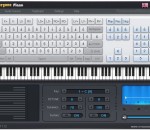
Everyone Piano is a computer keyboard simulating piano software, it can use the general computer keyboard to play the world famous piano music. With powerful timbre database, Everyone Piano's tone is lifelike and real-time. Even on onboard sound card, Everyone Piano can reach real-time musical performance, meantime it also simulates the footplate of the piano.
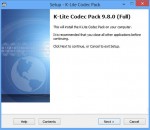
K-Lite Codec Pack is a collection of codecs and related tools. Codecs are required to encode and/or decode (play) audio and video. The K-Lite Codec Pack is designed as a user-friendly solution for playing all your movie files. With the K-Lite Codec Pack you should be able to play 99% of all the movies that you download from the internet. The K-Lite Codec Pack has a couple of major advantages compared to other codec packs: - It is always up-to-date with the latest versions of the codecs. - It is very user-friendly and the installation is fully customizable, meaning that you can install only those components that you really want. - It has been very well tested, so that the package doesn't contain any conflicting codecs. - It is a very complete package, containing everything you need to play your movies. There are three versions of the K-Lite Codec Pack: Basic, Standard and Full. K-Lite Codec Pack Basic contains only the most essential things. It contains everything you need to be able to play the most popular and widespread formats. It is small enough to fit on a single floppy. Also great for including on your movie CDs. K-Lite Codec Pack Standard contains everything you need to play all the commonly used formats. This package should be enough for the average user. K-Lite Codec Pack Full contains even more codecs. It also has encoding support for the various formats. This package is for power users and people who do their own encodings.
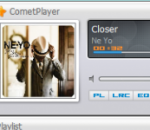
CometPlayer is a free audio player, it supports nearly all popular audio formats, such as mp3, mpa, mp2, wma, ogg, flac, ape, and wav. It is simple in interface, easy to use, and highly personalizable. The special features of this software comprise lyrics display (lyrics will be automatically searched from internet and then displayed in the lyrics panel), playlist creation, music equalizing (preset equalizer included), hotkeys setting, skin changing, and album cover switching.
Format Factory is a multifunctional media converter. Provides functions below: All to MP4/3GP/MPG/AVI/WMV/FLV/SWF. All to MP3/WMA/AMR/OGG/AAC/WAV. All to JPG/BMP/PNG/TIF/ICO/GIF/TGA. Rip DVD to video file , Rip Music CD to audio file. MP4 files support iPod/iPhone/PSP/BlackBerry format. Supports RMVB,Watermark, AV Mux. Format Factory's Feature: 1 support converting all popular video,audio,picture formats to others. 2 Repair damaged video and audio file. 3 Reducing Multimedia file size. 4 Support iphone,ipod multimedia file formats. 5 Picture converting supports Zoom,Rotate/Flip,tags. 6 DVD Ripper. 7 Supports 62 languages
Home of VobSub, Media Player Classic (MPC) and other misc utils.
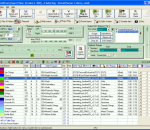
SynthFont is a program for playing midi files using SoundFonts. A midi file is different from - for instance - a MP3 file in that the file does not contain any audio data. The file is a collection of notes and instructions for how to play them. SynthFont combines this data with the audio data in a SoundFont to produce ("render") an audio version of the song. · Explorer view, similar to Windows Explorer. Use this to search for mid files, arrangements or sound sources. You can easily play all files in a folder. There's also a separate playlist. · Piano roll view, not only shows you the notes and controllers but also lets you do some basic midi file editing. · Events view, shows a list of all midi events in a particular track. You can filter out certain events and also do some basic editing, like changing notes and programs. Good for "debugging". · Tracks view. This view actually contains two parts: the synth engine and the tracks list. Use the synth engine part to add VST audio effects to on of the 16 channel busses or to the main effect. Use the tracks list to assign sound sources to the tracks. You can assign SoundFonts, GIGA files, DLS files, WAVE files and VST instruments. Each track can have its own set of sound sources. Here you can also add and delete tracks, mute track, play tracks solo, etc. · Layers view, shows the preset layers of a sound source. Each layer corresponds to what is internally called an "instrument". Usually a preset contains only one layer, but for stereo presets there is often two, panned left and right. · Splits view, shows the splits of an instrument (one preset layer). Here is where all the fun is. Each split references one - and only one - audio sample ("wave"). Each split also have range of parameters (called "generators") that you can edit. · Wave view, shows the sample data referenced by a split. Here also you can do some basic editing. · There is an additional tool for expert users: the SoundFont editor Viena (not to be confused with "Vienna"). Use this tool to create new SoundFonts from audio samples, or from presets and instruments in other SoundFonts. You can have four SoundFonts open at the same time and copy freely between them. There is also a Favorite Folders view and a Preset Cache for favorite presets. More info in the help file.
GOM Media Player The only media player you need - for FREE! Not only is GOM Media Player a completely FREE video player, with its built-in support for all the most popular video and Media Player formats, tons of advanced features, extreme customizability, and the Codec Finder service, GOM Media Player is sure to fulfill all of your playback needs. With millions of users in hundreds of countries, GOM Media Player is one of the world`s most popular video players. Whats New : Added "Touch Setting" feature for touch screen devices. Added "Search box" feature on playlist. (Ctrl+F) Supported "HTTPS URL" for youtube or net radio playback. (Ctrl+U) Added "Music Tap" on preferences related to play music files. Improved performance related to "speed of add & delete" of files on playlist. Other miscellaneous corrections, fixes, and changes
RealPlayer has always enabled you to play RealAudio (*.ra) and RealMedia (*.ram) files. Download videos from thousands of Web sites with just one click Build your own video library and playlists Play all major audio and video formats Flash Video support DVD, SVCD, VCD burning and video recording RealPlayer for personal use includes audio CD burning capabilities, DVR-style playback buffering, multimedia search, Internet radio, a jukebox-style file library, an embedded web browser (using Microsoft Internet Explorer), and the ability to transfer media to a number of portable devices, including Apple's iPod, MP3 players, and Windows Media devices.
GOM is a FREE media player with popular audio & video codecs built-in. Codec Finder GOM Player includes many codecs (XviD, DivX, FLV1, AC3, OGG, MP4, H263 and more) so you won't need to install separate codecs for most videos. For those videos that require a separate codec, GOM Player will find one. Play Broken AVI Files (Patented) GOM Player's patented technology enables users to view files with broken indexes or that are still being downloaded. Powerful Subtitle Support GOM Player supports SMI, SRT, RT, SUB(with IDX) files for subtitle. You can even synchronize subtitle and video if there's any mismatch. Convenient Playlist If you run a video file and there is already a file with a similar name in the directory, it will be automatically added to your playlist. GOM Player has a similar playlist format as M3U, PLS, ASX. Support Different Media Types Along with different media format such as AVI, MPG, MPEG and DAT, GOM Player also supports streaming Windows media format (WMV, ASF, ASX). You can also watch DVD-quality videos with 5.1 channel audio output.